Introduction
AI face swap is a technology that allows you to replace one person’s face with another in a photo or video while keeping everything else the same. The background, body movement, lighting, and expressions remain natural, so the final result looks realistic instead of edited or fake. What once required professional editing software and hours of manual work can now be done in seconds with modern artificial intelligence tools.
Over the last few years, AI face swap has become incredibly popular. You see it in funny social media posts, short videos, movies, advertisements, and even classroom projects. People use it to create memes, place themselves into movie scenes, or experiment with creative ideas that were once impossible without advanced skills. With easy-to-use apps and websites, anyone can try it, even without technical knowledge.
This guide will walk you through everything you need to know about AI face swap in clear and simple language. You will learn how the technology works, the types of swaps you can create, the best tools available today, and how to use them safely and responsibly. By the end, you will understand both the creative power and the limits of this fast-growing technology.
How AI Face Swap Technology Works Behind the Scenes?
At first glance, AI face swap might look like magic, but it relies on smart software and data analysis. The system studies thousands or even millions of human faces to learn how faces are shaped and how they move. This process is called training, and it helps the software recognize features such as eyes, nose, mouth, and skin tone.
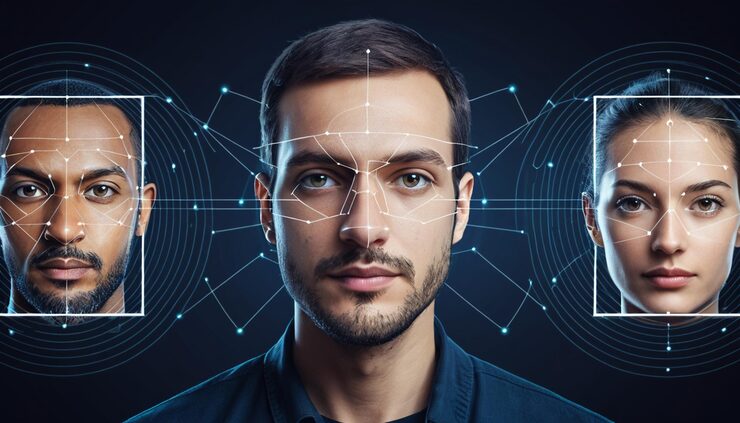
Once trained, the AI uses facial mapping. This means it finds key points on a face, such as the corners of the eyes and lips. It then builds a digital model that shows how the face moves. When you upload a photo or video, the system matches these points with the new face you want to insert.
Expression tracking is another important step. If the person in a video smiles, talks, or turns their head, the new face must follow those movements. AI tracks these small changes frame by frame so the swap looks smooth and natural. Lighting is also adjusted automatically. Shadows and highlights are matched so the new face blends with the environment.
There is also a difference between processing photos and videos. A single photo requires only one frame, so the result appears quickly. Videos contain hundreds or thousands of frames, so the system must repeat the process many times. This is why video swaps usually take longer but can still produce impressive results when done well.
Types of AI Face Swap You Can Create
Single-Face Photo Swaps
The most basic and common type of AI face swap involves replacing one face in a single image. This is popular for profile pictures, fun edits, or creative artwork. You simply upload a photo and another face, and the software blends them together. Because only one image is involved, results are fast and usually very clean.
Multi-Person Swaps
Some tools allow you to swap several faces at the same time. For example, you can replace everyone in a group photo with different faces. This type of AI face swap is often used for party pictures, family photos, or humorous edits where friends switch identities. It requires more processing but adds a fun and dynamic touch.
Video Re-Facing
Video face swap, often called re-facing, is more advanced. Here, the AI replaces a face throughout an entire video clip. This makes it possible to insert yourself into a movie scene or create short, realistic clips for social media. The software tracks movement and expressions across every frame so the face stays aligned as the person moves.
Gender Swaps and Creative Edits
AI face swap is also used for creative transformations. Some tools can adjust facial features to show how someone might look with a different gender appearance or artistic style. Others allow cartoon effects or fantasy edits. These options are popular for entertainment and storytelling, giving users more freedom to experiment.
Popular Uses of AI Face Swap in Everyday Life
AI face swap is not limited to entertainment. It has quietly become part of many areas of daily life. On social media, people use it to create funny memes, short videos, and personalized content. A quick face swap can turn an ordinary photo into something eye-catching and shareable.
In entertainment, creators use the technology to produce parody videos, fan edits, and creative remixes. Small content creators can achieve effects that once required big budgets. This has opened new doors for storytelling and online creativity.
Marketing teams have also started using AI face swap in campaigns. Brands can create localized ads or interactive experiences where users see themselves inside promotional videos. This personal touch often increases engagement and makes ads more memorable.
Education is another growing area. Teachers and students use face swap tools for presentations, history projects, or creative assignments. For example, students might place their faces on historical figures to make learning more engaging and fun.
Because it is easy to use and widely available, AI face swap continues to find new uses in both professional and personal settings.
Best AI Face Swap Tools and Apps Right Now
Pica AI
Pica AI is known for its fast online processing and simple interface. It supports both photos and videos and can handle multiple faces in a single project. Many users like it because results are generated quickly, and you do not need advanced skills to get started.
Canva Faceswap
Canva Faceswap is built directly into Canva’s design platform, which makes it convenient for creators who already use Canva for graphics. It works well for quick edits, presentations, and social media designs. The integration means you can swap faces and continue editing without switching tools.
Reface (Unboring)
Reface is one of the most recognizable AI face swap apps, especially on mobile devices. It focuses on short videos and animated clips. The app offers ready-made templates, making it easy for beginners to create fun content in seconds. Its strength lies in realistic video re-facing.
Remaker AI
Remaker AI provides several editing features beyond face swapping. It aims to deliver natural blending and high-quality results for both images and videos. Users who want more control and flexibility often prefer this platform.
Vidnoz
Vidnoz is popular among marketers and content creators who need professional-looking video swaps. It supports realistic outputs and is often used for promotional or business content. The platform focuses on speed and polished results.
When comparing these tools, the main differences usually come down to speed, video support, ease of use, and extra features. Some are better for fun social posts, while others are suited for business or professional projects. Choosing the right one depends on your specific needs.
How to Use AI Face Swap Tools Step by Step?
Using an AI face swap tool is usually straightforward, even for beginners. Most platforms follow the same simple process. You start by uploading the base image or video that you want to edit. This is the content where the new face will appear. Clear and well-lit media generally produces the best results.
Next, you upload the source face. This should be a sharp image where the face is clearly visible and not blocked by glasses, hair, or shadows. The software uses this image to build the replacement.
After uploading, many tools offer small adjustments. You might be able to fine-tune alignment, choose blending strength, or adjust color matching. These settings help make the final AI face swap look more natural.
Once everything is set, you start the process. For photos, it may take only a few seconds. For videos, it could take a few minutes depending on length. When finished, you simply download the result and use it as you like.
The overall process is designed to be simple so that anyone can create swaps without technical knowledge.
Tips for Getting More Realistic Face Swap Results
Even though AI face swap tools are smart, the quality of your input still matters a lot. High-resolution images usually give the best outcome because the software has more detail to work with. Blurry or pixelated photos often lead to poor blending.
Matching angles is also important. If the source face looks straight ahead but the target face is turned sideways, the result may look unnatural. Similar lighting conditions help as well. A bright face placed into a dark scene can look out of place.
It is also helpful to avoid images where the face is partly hidden by hands, hair, or objects. The AI may struggle to understand the shape properly. Taking a little time to choose the right photos can make a big difference in the final result.
Common mistakes include using low-quality images or expecting perfect results from very complex scenes. Keeping things simple often works best.
Privacy, Consent, and Ethical Use of AI Face Swap
While AI face swap is fun and creative, it also comes with responsibility. Replacing someone’s face without their permission can lead to privacy problems or hurt feelings. Consent should always come first. If you plan to use someone else’s image, make sure they agree.
There are also risks of misinformation. Face swaps can make it look like someone said or did something they never did. This can be harmful, especially when used to spread false content. For this reason, many platforms have rules about how the technology should be used.
Using AI face swap responsibly means being honest and respectful. It should be used for entertainment, creativity, or educational purposes, not to deceive or harm others. A thoughtful approach helps keep the technology positive for everyone.
Limitations and Challenges to Be Aware Of
Even the best AI face swap tools are not perfect. Sometimes you may notice strange edges, color differences, or small glitches. These visual issues are called artifacts and can make the swap look less realistic.
Processing time can also be a challenge, especially for long videos or high-resolution files. Larger projects require more computing power and patience. Not every device or platform handles heavy tasks smoothly.
Legal and copyright concerns are another factor. Using copyrighted footage or images without permission may cause problems. It is important to respect ownership rights when creating content.
There are also situations where results simply fail. Extreme angles, fast movement, or poor lighting can confuse the system. Understanding these limits helps you set realistic expectations.
The Future of AI Face Swap Technology
AI face swap technology continues to improve quickly. Real-time video swaps are becoming more common, allowing changes to happen live during video calls or streams. This could open new possibilities for entertainment and virtual meetings.
Generative AI is also making results more realistic. Faces blend more smoothly, and small details like skin texture look more natural than ever before. These improvements reduce the “edited” look that older tools sometimes had.
Integration with editing apps and social platforms is another trend. Instead of using separate software, users can perform swaps directly inside their favorite apps. This makes the process faster and more convenient.
Looking ahead, AI face swap will likely become even easier, faster, and more accurate. As the technology grows, creative opportunities will expand as well.
Conclusion: Using AI Face Swap Creatively and Responsibly
AI face swap has changed the way people edit photos and videos. What used to require professional skills is now available to everyone with just a few clicks. From social media fun to marketing and education, the possibilities are wide and exciting.
At the same time, it is important to use this technology with care. Respecting privacy, getting consent, and avoiding misleading content helps keep AI face swap positive and safe for everyone. When used thoughtfully, it can be a powerful creative tool that brings ideas to life.
By understanding how AI face swap works, choosing the right tools, and following best practices, you can explore its benefits while staying responsible. With the right balance, this technology becomes not just a trend, but a useful and enjoyable part of modern digital creativity.
FAQs
Is AI face swap safe to use?
Yes, it’s safe if you use trusted tools and respect privacy. Always get permission before using someone else’s face.
Can I swap faces in videos or only photos?
You can do both. Photos are faster, while videos take longer but look more realistic with motion tracking.
Which AI face swap app is best for beginners?
Apps like Reface and Canva Faceswap are very beginner-friendly and easy to use with ready-made templates.
Why does my face swap look fake sometimes?
Low-quality images, poor lighting, or different face angles can cause unnatural results. Clear photos usually fix this.
Is AI face swap legal?
It’s legal for personal and creative use, but using someone’s image without consent or for misleading content can cause legal issues.